April 17th, 2026
v0.11.0 | Realtime, Notepad, Offline support and more™
Hey Pioneer! A packed release this time: the planner is no longer a solo experience. You can now plan factories alongside your friends in real time, keep notes as you design, discover everything the game offers through a built-in Codex, and get hand-held through the tool with an interactive tutorial. Plus a bunch of quality-of-life improvements we have been sitting on.
Let's dive in.
What's new
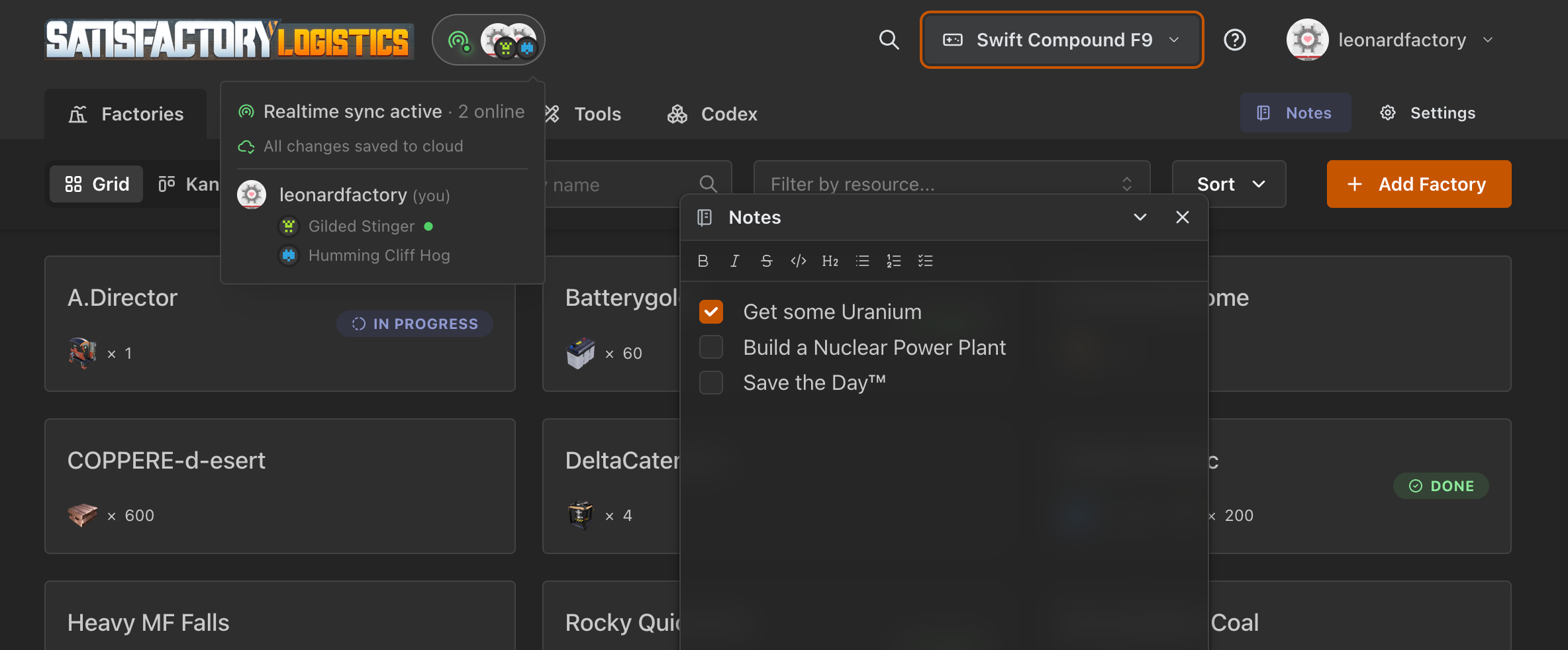
Real-time sync & online peers
The big one. If you sign in, your games and factories now sync live across tabs, devices, and teammates. Open the same game as a friend and you will see their avatar in the header.
Saving is also automatic and triggered even when you close the tab, so you won't lose that last edit.

Interactive tutorial
New users are greeted by a "Hello, Pioneer!" welcome modal with a guided tour. The tour covers factory basics, the calculator, linking, charts, the codex, and notes, broken into chapters you can run independently. Veterans can relaunch any chapter at any time from the ? icon in the header.

Codex & unified Spotlight search (Cmd+K)
Two connected features. A new Codex tab puts every item, recipe, and building in a browseable encyclopedia, so you don't need the wiki open on a second monitor. Press Cmd+K (or tap the new search icon in the header on touch devices) to open the spotlight and search across items, recipes, buildings, and your own factories, all in one list.

Notepad
A draggable, collapsible notes panel powered by TipTap. Keep plans, reminders, or raw data next to your factory without leaving the page. Notes are per-factory and per-game, sync with the rest of your data, and support rich text with a fixed formatting menu.

Splitter calculator
New tool under the Tools tab for sizing splitter/manifold layouts. Give it an input rate and the number of outputs, get a React Flow graph showing the required splitter chain.

Graph display settings
Two new toggles in the Game Settings modal for the chart view: orthogonal edges for a cleaner, diagram-like look, and a switch to disable the animated dots on edges if you find them distracting (or your GPU does). While we were there, the settings modal got a small UI refresh.
Disabled factory state
You can now mark a factory as disabled. Disabled factories show a clear banner in their detail page, appear dimmed in the list, and are excluded from charts and the solver. Useful for archiving old plans without deleting them or freezing a WIP while you think.

Offline support (PWA)
Satisfactory Logistics now installs as a PWA with full offline support on Chromium browsers. Find the Install app option in your user menu. Once installed, the planner keeps working even without a connection; changes sync the next time you are online.
Under the hood
Factory links in charts. Click a node in the Sankey or node graph to jump straight to that factory.
Game menu rewrite: better realtime sync handling, auto-generated random names for new games, guarantee that at least one game always exists, cleaner deletion flow.
Offline & connection handling: clear notifications when you drop offline, updated sync indicator states.
Navbar tabs use a shared layout, so active state and routing no longer flicker.
A bunch of smaller sync, notes, and RLS fixes we won't bore you with.
What's next
Implementation of the remaining asked features on Featurebase
Fine-tuning and small fixes
Thanks for sticking with us, and, as always, bug reports and feature requests are welcome on Featurebase or GitHub.
Happy planning, Pioneers!